A voice AI agent can have accurate transcription, a capable language model and a natural voice, and still feel broken because it answers too late. A useful engineering target is under 500 ms from the end of the user's utterance to the first audible response, and hitting it takes a streaming, concurrent pipeline rather than a faster model.
Voice AI latency is the time between a conversational event, such as the user finishing a sentence, and the corresponding response becoming audible. For conversational agents the number that matters is end-of-turn to first-audio latency: the gap between the moment the user actually stops speaking and the moment the first playable audio from the agent reaches them.
This guide covers:
- Where latency accumulates across the speech-to-text (STT), LLM and text-to-speech (TTS) pipeline
- A practical sub-500 ms latency budget, with a sequential versus streaming comparison
- Seven techniques to reduce end-to-end voice AI latency
- A barge-in (interruption handling) architecture
- A reproducible protocol for benchmarking your own pipeline at p50, p95 and p99
- When to use a cascaded pipeline versus a speech-to-speech model
What is voice AI latency?
Several different numbers get called "latency". They are related but not interchangeable.
A TTS provider advertising 80 ms time-to-first-audio does not mean your agent can respond in 80 ms. The turn detector, STT finalization, LLM, buffering, transport and playback all sit on the same path.
Why target 500 milliseconds?
Human conversation relies on short gaps between speakers, often a few hundred milliseconds. A practical, directional framework:
- Under 500 ms: an aggressive target for highly responsive agents.
- 500 to 800 ms: a useful intermediate target for many production applications.
- 800 to 1,500 ms: delays become noticeable, especially in short exchanges.
- Over 1,500 ms: the experience can feel sluggish, particularly over repeated turns.
These are UX guidelines, not universal thresholds. A research assistant can reasonably take longer than an agent answering a routine order-status question. Evaluate latency against conversational expectations, not against individual API benchmarks.
Anatomy of the STT-LLM-TTS latency pipeline
Most modular voice agents use a cascaded architecture: microphone, STT, LLM, TTS, speaker. In a naive implementation each stage waits for the previous one to finish:
- The user finishes asking a question.
- The STT engine waits to confirm the end of the utterance.
- The final transcript is submitted to the LLM.
- The system waits for the LLM to generate a complete response.
- The full response is sent to the TTS engine.
- The synthesized audio is returned and played.
Even when every model is individually fast, the combined interaction can take seconds.
Sequential vs. streaming: the latency budget
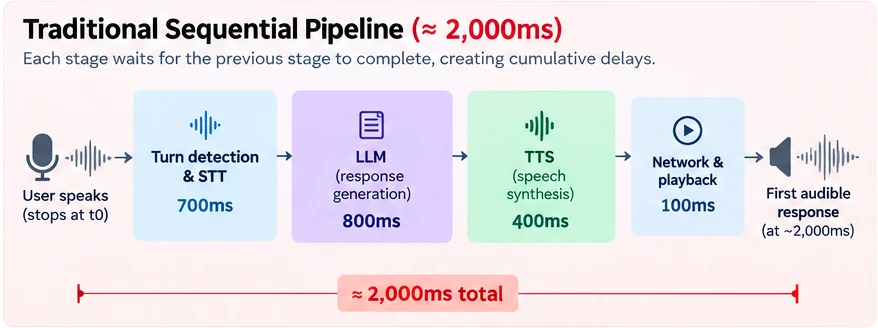
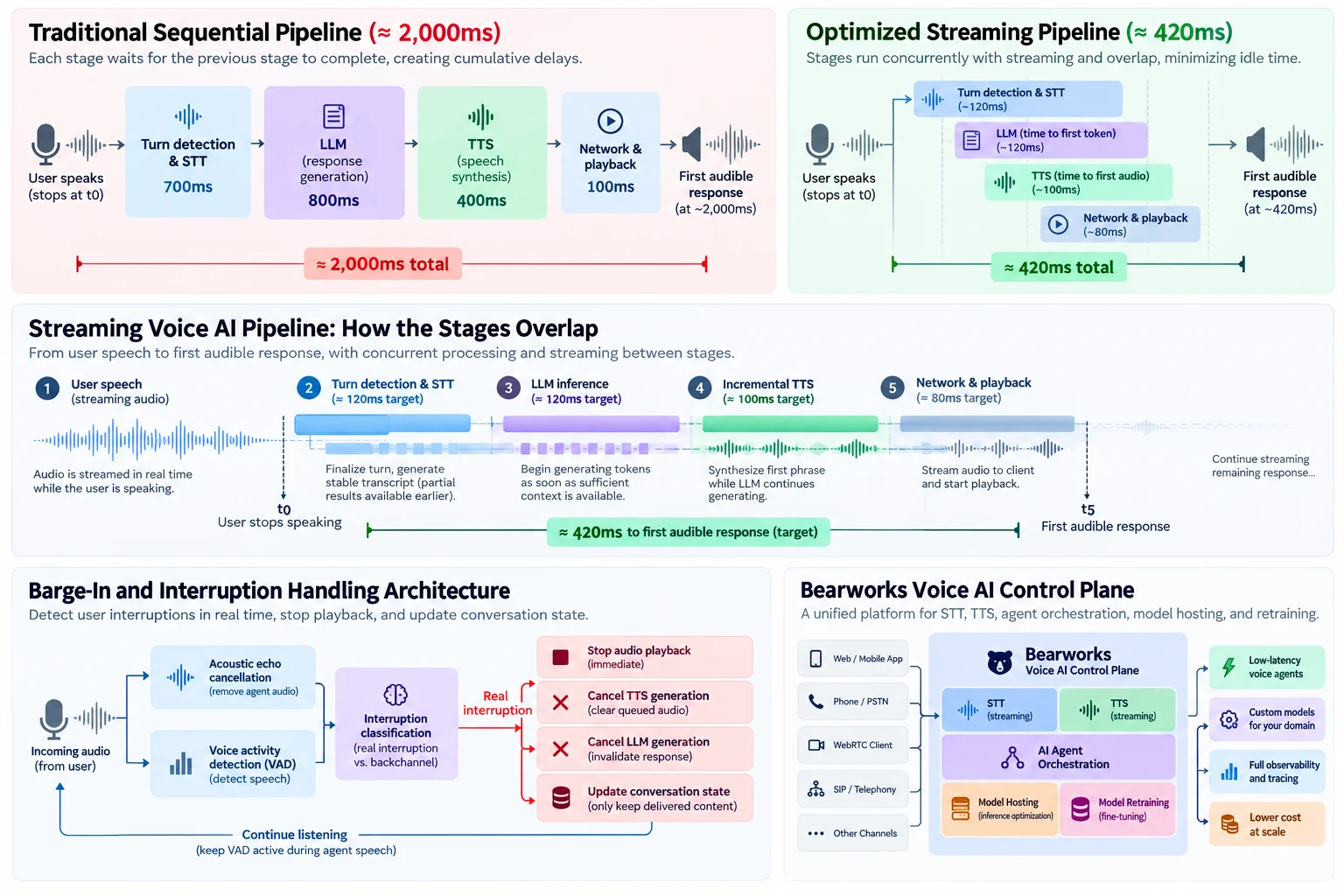
The two diagrams below compare an illustrative sequential pipeline with a concurrent streaming pipeline that targets 420 ms. The stage values are example budgets for explaining the critical path, not measured results.
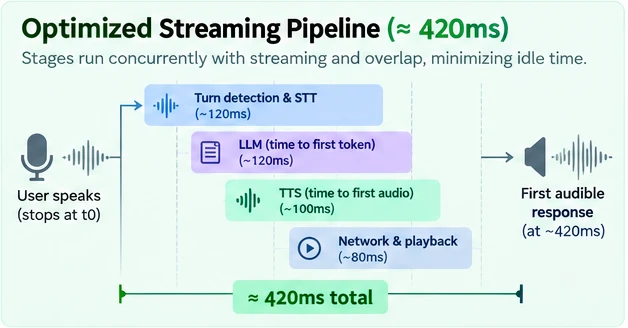
The streaming budget breaks down like this:
That leaves roughly 80 ms of headroom against a 500 ms target. These are proposed engineering budgets, not measured Bearworks performance or guaranteed benchmarks for any provider.
In a fully sequential system, delays accumulate approximately as:
In a streaming system much of that work overlaps. STT processes speech while the user is still talking, the LLM can start from a sufficiently stable transcript, and TTS can synthesize the first phrase before the LLM finishes the answer. That is why you cannot calculate end-to-end latency by adding up standalone component benchmarks.
The key to sub-500 ms voice AI is not making each model faster. It is eliminating unnecessary waiting between models.
Seven techniques to reduce voice AI latency
1. Stream STT instead of waiting for final transcripts
Traditional recognition processes complete utterances or large audio buffers. Streaming STT continuously processes incoming audio and returns partial hypotheses. For a user saying "I'd like to check the status of my order", a streaming recognizer progressively emits "I'd like...", "I'd like to check...", and so on, so downstream components can start preparing context, such as preloading an order-status workflow, before the utterance ends.
- Use persistent bidirectional streaming connections for audio.
- Process interim transcripts without waiting for full utterance completion.
- Track transcript revisions instead of treating every partial as final.
- Use stable transcript prefixes or confidence thresholds before speculative actions.
- Avoid launching a new LLM request for every STT update.
Partial transcripts are not always accurate, and early words can be revised as more audio arrives. Speculative processing should therefore be cancellable, and sensitive actions such as payments or account changes should require confirmed intent.
2. Optimize turn detection and endpointing
One of the most overlooked sources of latency is not model inference. It is silence. Before responding, the agent must decide whether the user has finished or is pausing mid-sentence. A system that waits a fixed 700 ms after every sentence cannot consistently hit a 500 ms end-of-turn target without preemptive processing, because that wait is added directly to response latency.
A more effective design combines three layers:
- Voice activity detection (VAD): decides whether incoming audio contains speech rather than silence or noise.
- Endpoint detection: identifies likely boundaries between utterances.
- Semantic turn detection: uses linguistic context, and potentially acoustic features, to judge whether a thought is complete.
"I'm trying to book a flight from New York to..." is incomplete even after a pause, while a bare "Yes" can be a complete turn after a very short one. The best systems adjust the waiting period to conversational context.
Optimization tip: measure endpointing delay separately from STT inference time. Cutting unnecessary endpointing delay can improve response latency without changing the speech model. Frameworks expose this directly: LiveKit's turn-taking tuning guide covers minimum and maximum endpointing delays and preemptive generation, which starts a response before the end of turn is confirmed at the cost of some wasted compute when it is cancelled.
3. Reduce LLM time-to-first-token
For voice agents, time-to-first-token (TTFT) usually matters more than total generation time, because the agent needs only enough text to begin speaking, not a complete paragraph.
- Choose smaller, faster models for routine turns. A small language model (SLM) can be enough for intent classification, scheduling, order status and FAQ answers.
- Use prompt caching. System instructions, personas and stable knowledge can be reused across turns instead of reprocessed.
- Trim the prompt. Sending the full transcript and a large knowledge base every turn adds processing time. Use summarization, selective retrieval and structured state.
- Avoid blocking tool calls. A slow CRM or database query can dominate the budget regardless of model speed. Prefetch likely context, cache frequent lookups and run independent calls concurrently.
- Optimize serving. Latency depends on model size, quantization, hardware, batching, GPU utilization and queueing, not just benchmark tokens per second.
The ideal model is not the most powerful one available. It is the smallest, fastest model that reliably completes the task.
4. Stream LLM output directly into TTS
A common mistake is waiting for the LLM to finish its whole response before starting speech synthesis. Suppose the agent generates:
"Absolutely. I can help you check your order status. Could you provide your order number?"
The system can send "Absolutely." to TTS as soon as that first phrase completes, then the next sentence, while the LLM keeps generating. This is incremental TTS, also called chunked or sentence-streamed speech synthesis. Cloudflare's voice agent example uses this pattern: the response is sentence-chunked and synthesized as it streams, over a single WebSocket.
Chunking needs tuning. Chunks that are too small produce unnatural pacing and audible discontinuities; chunks that are too large raise time-to-first-audio. A robust chunker considers:
- Sentence and clause boundaries
- Minimum contextual length
- Punctuation and phrasing
- Whether the TTS engine supports streaming input
- Audio buffer continuity
A common compromise is to flush a short first phrase at a natural boundary, then use longer chunks for the rest. Optimization tip: measure both first-audio latency and audible continuity. An agent that starts instantly but pauses awkwardly between phrases has not solved the problem.
5. Eliminate unnecessary network round trips
A voice pipeline can span several independently hosted services: the caller's network, an application server, an STT service, an LLM provider and a TTS provider, with audio returning along the same path. Each boundary adds transport delay, buffering, serialization and a failure mode.
- WebRTC suits real-time audio to browsers and mobile apps: low-latency media transport, jitter handling and network adaptation.
- WebSockets provide persistent bidirectional communication, well suited to streaming transcripts, text and audio between services.
- HTTP is not inherently slow. Persistent connections and streaming responses work well. The cost comes from repeatedly establishing requests, buffering full payloads and adding service hops to the critical path.
Practical steps:
- Keep streaming connections open for the whole conversation.
- Co-locate STT, LLM and TTS where practical, and avoid cross-region traffic.
- Avoid unnecessary encode and decode conversions.
- Reduce intermediate buffering.
- Place latency-sensitive inference close to the media ingress point.
6. Implement low-latency barge-in and interruption handling
Low latency is not only how quickly an agent starts talking. It is also how quickly it stops. Barge-in is the ability for a user to interrupt the agent mid-response and have the agent yield the floor. If an agent is saying "Your order is expected on Thursday, and I can also help you with..." and the customer says "Actually, I want to change the address," a well-designed agent stops, discards the rest of its answer and responds to the new intent.
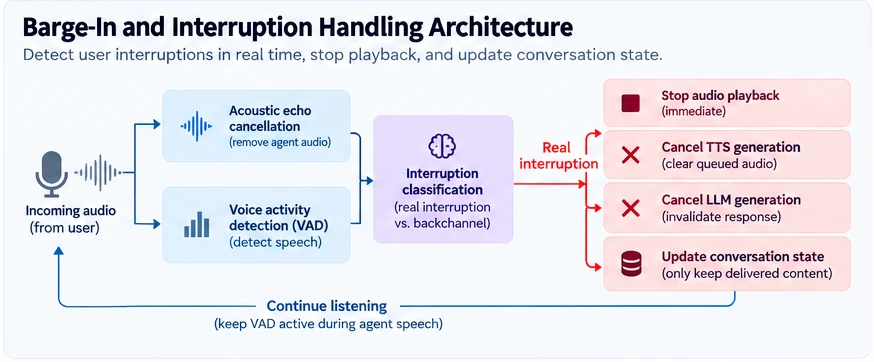
A reliable barge-in system follows four steps.
- Keep listening while the agent speaks. The microphone or telephony stream stays active, with acoustic echo cancellation removing the agent's own audio and VAD detecting incoming speech without waiting for a transcript.
- Tell real interruptions from backchannels. A caller saying "uh-huh" or "okay" is acknowledging, not taking over. Better systems combine acoustic detection with contextual or semantic classification. LiveKit's adaptive interruption handling is one example: an audio model runs after VAD to separate genuine interruptions from backchannel acknowledgments, as opposed to treating any detected speech as an interruption.
- Stop playback and cancel obsolete work. Stop the current audio, clear queued audio, cancel outstanding TTS synthesis where possible, and cancel or invalidate the LLM generation. Cancelling upstream inference is not enough: audio already queued on the client must also be stopped.
- Synchronize conversation state. Suppose the LLM generated 50 words but the user heard only the first 10. If the history contains all 50, the model may assume it communicated information the user never received. The conversation state should reflect what was actually delivered, as closely as playback acknowledgement and alignment allow.
Can barge-in have zero latency? Not literally. Detection, classification, event propagation and playback cancellation all take time. A more useful objective is near-immediate perceived interruption, measured from the onset of user speech to the end of agent playback, and benchmarked separately from end-of-turn response latency.
7. Optimize infrastructure for model serving
Even an optimized pipeline is slow if the inference infrastructure is overloaded. Production voice workloads are sensitive to tail latency: a model that returns its first token in 100 ms under light load can behave very differently when hundreds of concurrent conversations compete for GPU capacity.
- GPU utilization and queueing: oversubscribed servers and aggressive batching raise TTFT.
- Quantization: lower-precision weights can cut memory and improve efficiency, subject to quality and hardware trade-offs.
- Warm model instances: avoid loading models into memory per conversational request.
- Regional deployment: host models near the application or media server.
- Autoscaling and admission control: scale on active conversations, queue depth and latency rather than CPU alone.
- SLM fine-tuning: a small model trained for a narrow task can beat a general-purpose LLM on latency and cost, provided it meets quality requirements.
These choices also drive unit economics. For high-volume voice products, GPU cost per generated token or synthesized second can change gross margin. See our cost breakdown for scaling voice AI agents to 1,000+ concurrent calls.
Real-time voice AI architecture: sequential vs. streaming
The architectural difference is sequential execution versus concurrent execution.
- Sequential: audio, then complete STT, then complete LLM response, then complete TTS, then playback. Every stage blocks the next, and total delay grows with STT finalization, response length and synthesis time.
- Streaming: audio, then streaming STT, then incremental LLM, then chunked TTS, then streaming audio. STT starts while the user speaks, stable transcript information triggers preparatory work, tokens are streamed as they appear, text chunks reach TTS before the answer is complete, playback begins while later speech is still generating, and interruption detection stays active throughout.
Concurrency is not free of dependencies: TTS still needs usable text and the agent still has to manage turn boundaries. But it removes idle time and shortens the critical path. Gladia's write-up on concurrent pipelines for real-time voice AI covers the same idea from the implementation side: overlapping audio capture, transcription, LLM processing and synthesis with async queues so no stage idles while another works.
The biggest improvement is often not a faster STT or TTS model in isolation. It is better orchestration between the models.
Cascaded STT-LLM-TTS vs. native speech-to-speech models
Cascaded pipelines use separate recognition, language and synthesis components. Native speech-to-speech (S2S) models process audio in and generate spoken responses inside a more integrated model. Neither is universally better.
For enterprise applications, a cascaded architecture offers valuable flexibility: a domain-specific STT model, a fine-tuned SLM for routine interactions and a branded TTS voice, each replaceable independently. Native S2S models are attractive when expressive, low-latency behavior with fewer processing boundaries is the priority. Choose on latency, accuracy, cost, observability, customization and compliance requirements.
How a voice AI control plane simplifies latency optimization
Optimization gets harder as infrastructure grows. A team starts with one STT provider, one LLM and one TTS engine, then adds speech models, inference providers, regional deployments and domain-specific agents. Each addition is another configuration surface, monitoring requirement and potential bottleneck.
A voice AI control plane is the operational layer that manages and optimizes the voice AI lifecycle instead of treating STT, LLM, TTS and model hosting as disconnected components. At Bearworks we are building this around five capabilities:
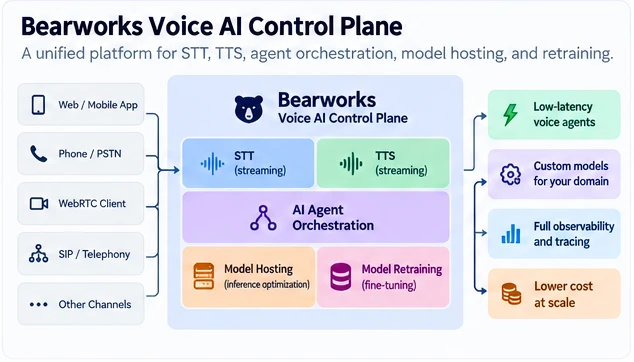
- Unified speech-to-text: low-latency streaming recognition that is compatible with downstream models, without separate integration logic for every voice application.
- Integrated text-to-speech: a streaming engine that turns incremental model output into speech without waiting for a complete response.
- AI agent orchestration: coordination of turn detection, response generation, tool calls, interruption handling and session state.
- Model hosting and inference optimization: control over deployment location, serving configuration, model size and inference cost for latency-sensitive workloads.
- Model retraining and fine-tuning: domain-specific models for intent detection, call classification or routing that can be smaller and faster than general-purpose ones.
Why integrated streaming infrastructure matters
A unified control plane can reduce the integration and transport overhead of a fragmented stack. Instead of passing fully buffered requests between independently orchestrated services, components can share persistent streaming connections and run as a single pipeline.
That is a design advantage, not an automatic result. Placing several services behind one API does not by itself remove network latency. The real gains depend on deployment topology, streaming implementation, scheduling and inference efficiency, which is why the benchmark protocol below matters.
A step-by-step checklist for building sub-500 ms voice agents
Before replacing providers or retraining models, optimize the system you already have.
- Establish a baseline. Measure end-of-user-speech to first-playable-audio across real conversations. Record median, p95 and p99.
- Instrument every stage. Capture endpointing, STT partial and final outputs, LLM TTFT, TTS TTFA, transport and playback, with a common trace ID.
- Identify the critical path. Separate sequential wait time from work that already runs concurrently.
- Enable streaming throughout. Use streaming STT, token-streaming inference, incremental TTS and continuous audio delivery.
- Tune turn detection. Experiment with endpointing thresholds and semantic turn detection to cut silence without cutting users off.
- Optimize first-token generation. Reduce prompt size, use caching, evaluate smaller models and remove synchronous tool calls.
- Implement incremental speech synthesis. Send meaningful phrases to TTS before the LLM finishes.
- Optimize service placement. Minimize cross-region traffic, protocol conversions and repeated connection setup.
- Implement robust interruption handling. Echo cancellation, continuous speech detection, interruption classification, immediate playback cancellation and conversation-state correction.
- Test under production conditions. Realistic networks, concurrent sessions, background noise, accents, long conversations, tool calls and frequent interruptions.
Success is not hitting 500 ms once in a single benchmark. It is maintaining responsive conversations across the workload your application actually serves.
How to benchmark voice AI latency: a reproducible protocol
Published latency figures are hard to compare because vendors measure different things under different conditions. A benchmark is only useful if someone else can repeat it. The protocol below is the one we recommend for comparing STT, LLM and TTS combinations, and the one to use when validating any provider's claims on your own traffic.
1. Record the same timestamps for every turn
Intermediate differences give per-stage figures, but interpret them carefully because streaming stages overlap. For distributed systems, use a shared clock or correlated monotonic timers. Otherwise timestamp differences across servers produce misleading results.
2. Control the inputs
- Replay recorded audio. Feed identical audio fixtures into every configuration rather than live speakers, and take
t0from the fixture's annotated end of speech, not from the system's own VAD. - Vary the conditions deliberately. Include clean audio and noisy audio, short and long utterances, and turns that trigger a tool call.
- Hold everything else constant. Same LLM, prompt, region and network path when comparing STT or TTS engines; change one component at a time.
- Warm up, then measure. Discard the first turns of each session so cold-start effects are not mixed into steady-state numbers.
- Test under load. Repeat each configuration at several concurrency levels, since tail latency changes under contention.
3. Collect enough samples
Percentiles need volume. As a rule of thumb, a p95 is only meaningful with a few hundred turns per configuration, and a p99 needs on the order of a thousand. With a few dozen turns you can report a median and a range, but not a tail.
4. Report the full distribution, not a single number
- Median (p50): typical performance during ordinary calls.
- p95: what the slowest 5% of turns experience.
- p99: the latency tail.
- Barge-in stop latency: time from the start of a user interruption to audible playback ceasing. Measure it by injecting interruption audio at a known offset into agent speech.
- False interruption rate: how often the agent stops for backchannels such as "uh-huh" or background noise. Measure it with backchannel-only fixtures.
- Speech continuity: frequency and duration of unintended gaps between synthesized chunks.
- Cost per conversation minute: model and infrastructure cost under representative traffic.
A system with a 350 ms median and a 2-second p95 still delivers an inconsistent experience. Production optimization has to consider speed and reliability under load together.
5. Publish enough to be reproduced
A result is only as credible as its methodology. Alongside the numbers, publish: the exact provider and model versions, regions and network path, the audio fixture set and its annotations, concurrency levels, sample counts per configuration, the measurement code, and the raw per-turn timings. Include the failures and outliers; trimming them is the most common way latency claims get inflated.
The figures in this article are engineering budgets and illustrative examples, not measurements from this protocol. Run it against your own stack and traffic before treating any number, ours included, as a result.
Frequently asked questions
What is a good latency for a voice AI agent?
A response under 500 ms, measured from the end of user speech to the first audible agent response, is an aggressive target for highly responsive voice AI. Somewhat slower responses can be acceptable depending on conversation complexity, reliability requirements and application context.
How can I reduce voice AI latency?
Start by measuring end-to-end latency and instrumenting each pipeline stage. The highest-impact optimizations are usually streaming STT, tuned endpointing, lower LLM time-to-first-token, incremental TTS, overlapping execution and fewer network hops.
Can an STT-LLM-TTS pipeline achieve sub-500ms latency?
Yes, under suitable conditions, particularly when the stages stream and overlap. Consistent sub-500 ms performance depends on turn detection, model inference, audio transport, network conditions and workload complexity, so validate it with end-to-end benchmarks rather than inferring it from individual provider claims.
What is time-to-first-audio (TTFA)?
TTFA is how long a TTS engine takes to produce its first audio output after receiving suitable input text. It is a useful component benchmark, but it does not include the full conversational pipeline or the time before audio becomes audible to the user.
What is barge-in in voice AI?
Barge-in is the ability for a user to interrupt an AI agent while it is speaking. Effective barge-in combines speech detection, interruption classification, immediate playback cancellation, upstream generation control and conversation-state synchronization.
Is WebRTC faster than WebSockets for voice AI?
WebRTC is designed for real-time media transport and has built-in jitter handling, packet-loss recovery and network adaptation. WebSockets provide efficient bidirectional application streaming and can also support low-latency voice AI. The best choice depends on the client, network, media architecture and deployment topology.
Are smaller language models better for real-time voice agents?
Smaller models can offer lower inference latency and operating cost, especially for narrow tasks such as intent classification, routing and structured support workflows. Verify that a smaller model meets your accuracy and reliability requirements.
What is the difference between response latency and interruption latency?
Response latency is how long the agent takes to begin speaking after the user finishes a turn. Interruption latency is how long the agent takes to stop speaking after the user starts interrupting. Both affect responsiveness, but they measure different parts of the system.
How do I benchmark voice AI latency?
Record timestamps for the last user speech sample, turn completion, first STT output, first LLM token, first synthesized audio and first audible playback. Replay identical audio fixtures, hold other components constant, collect hundreds of turns per configuration, and report p50, p95 and p99 rather than a single average.
Fast voice AI requires full-pipeline optimization
The path to sub-500 ms voice AI does not begin and end with choosing a faster language model. Responsiveness is an end-to-end engineering problem. Speech recognition must stream partial results. Turn detection must minimize unnecessary silence. Language models must produce useful output quickly. TTS must synthesize incrementally. Transport must avoid needless delay. And the system must handle interruptions without losing conversational context.
Most importantly, these components have to work together. A voice agent built from individually fast APIs can still be slow if they run sequentially, and a well-designed streaming architecture can cut perceived latency by overlapping work and removing idle time.
Assumptions behind these numbers
- Latency budgets: the 420 ms streaming budget and the roughly 2,000 ms sequential comparison are illustrative engineering targets for explaining the critical path. They are not Bearworks measurements or guaranteed provider benchmarks.
- UX thresholds: the 500 ms, 800 ms and 1,500 ms bands are directional guidelines, not universal limits.
- Sample sizes: the percentile guidance is a rule of thumb for statistical stability, not a formal requirement.
- Framework capabilities: LiveKit, Cloudflare and other platforms change quickly. Check each project's current documentation before you commit to an architecture.
Sources and further reading
- LiveKit: Turn-taking tuning (endpointing, preemptive generation and interruption configuration)
- LiveKit: Adaptive interruption handling
- Gladia: Designing concurrent pipelines for real-time voice AI
- Cloudflare Agents: Voice agent example
- Voice AI Control Plane vs. DIY Orchestration: When to Build, Buy, or Self-Host
- How to Scale Voice AI Agents to 1,000+ Concurrent Calls Without Breaking the Bank

Turn Calls into Deals
with Bearworks
Ready to get started? Book a demo: