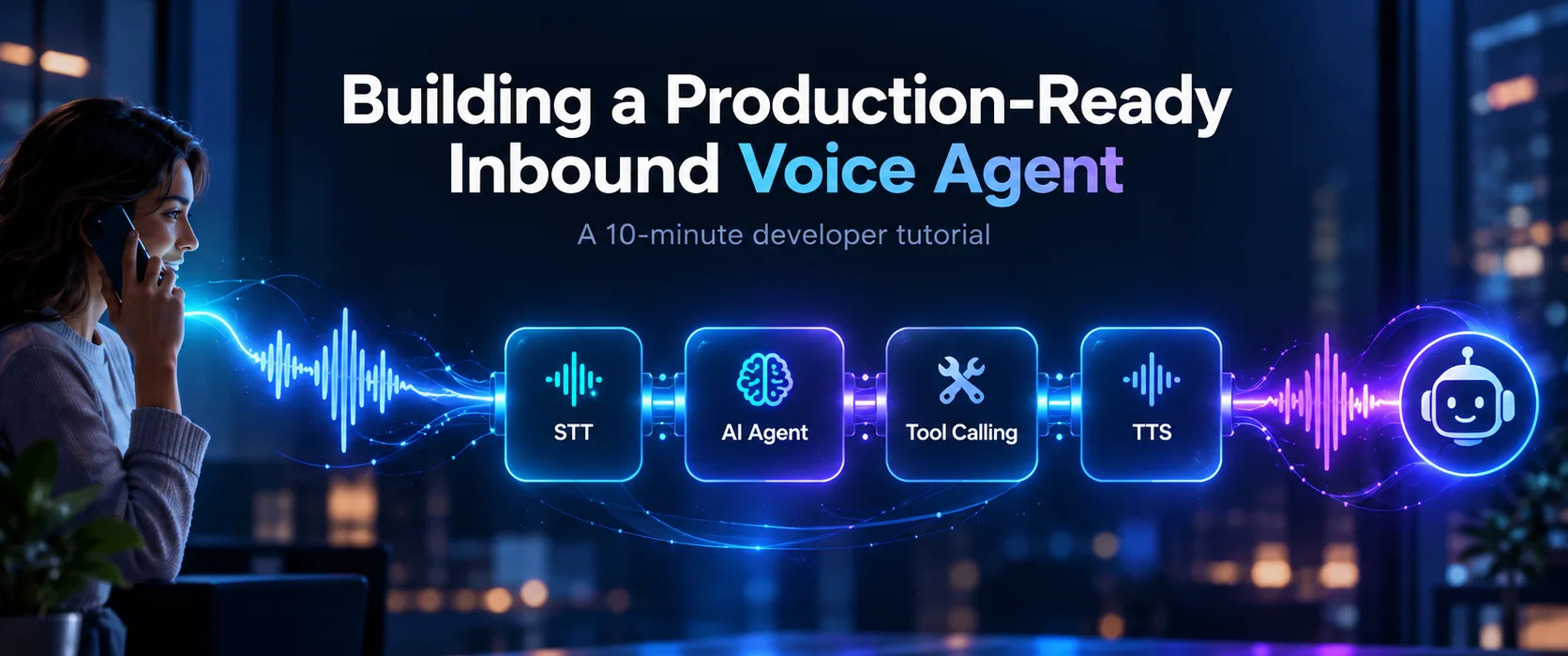
You can have a voice AI agent answering real phone calls in about 10 minutes. To build one, connect an audio transport (a phone number or WebRTC), streaming speech-to-text (STT), a language model with tool calling, and streaming text-to-speech (TTS), then instrument every call so you can see what happened when something goes wrong. The first part is now quick. The second part is what makes an agent production-ready.
This tutorial walks through building an inbound customer-support voice agent in Python. By the end, your agent will:
- Answer an inbound phone call or browser session in natural spoken language
- Transcribe the caller with STT, reason with an LLM and reply with TTS
- Call your backend API to look up real order data instead of guessing
- Handle interruptions (barge-in) and follow-up questions
- Produce the call logs, audio, latency metrics and traces you need to debug and improve it
How do you build a voice AI agent?
A voice AI agent is a pipeline of five parts: an audio transport that carries the call, a speech-to-text model that turns caller audio into text, an LLM agent that decides what to say and which tools to call, a text-to-speech model that speaks the reply, and an orchestrator that streams audio between them, detects when the caller has finished speaking and handles interruptions. A control plane sits alongside the pipeline to record, measure and version everything it does.
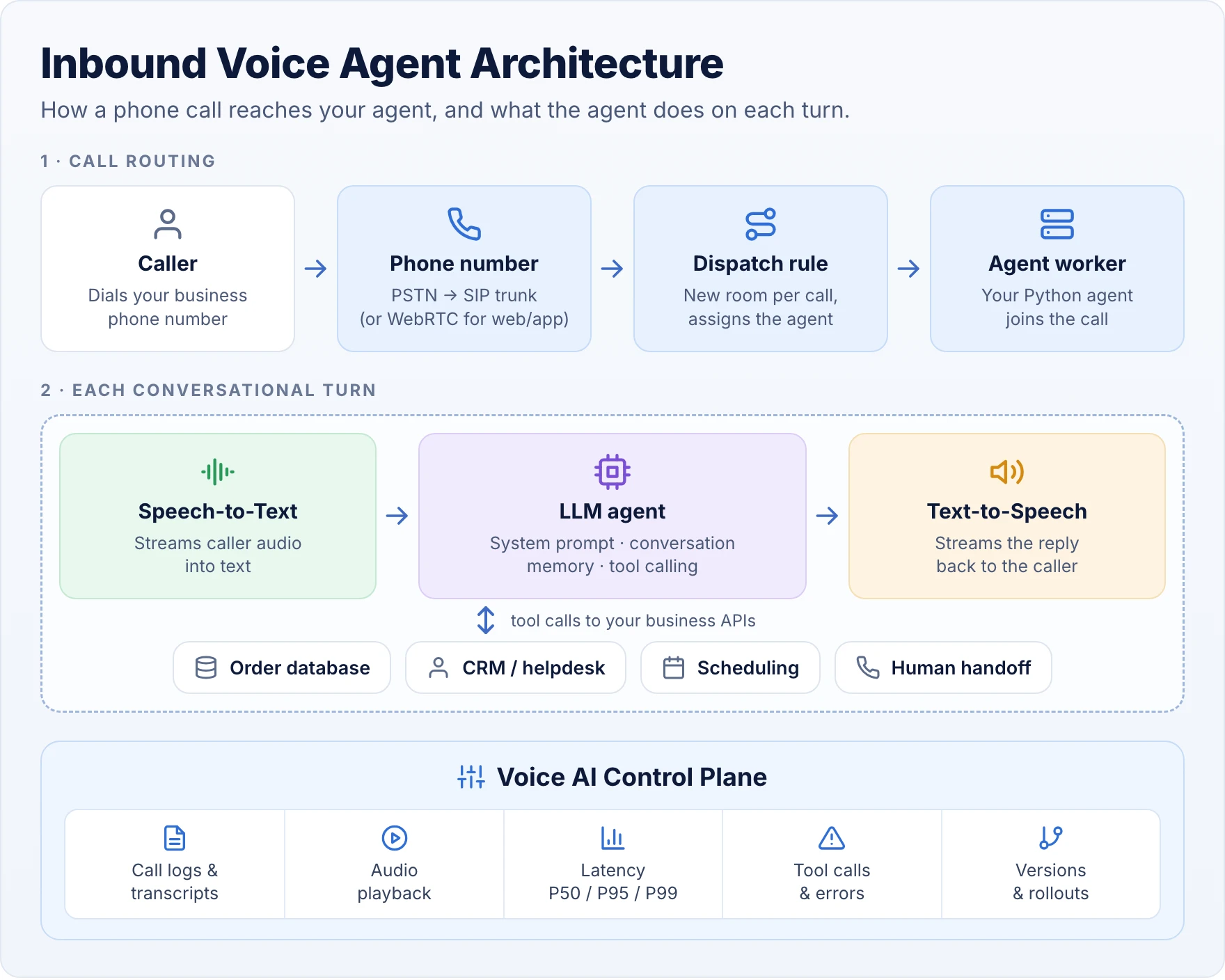
Here is what each layer is in this tutorial:
We use LiveKit Agents because its maintained starter includes telephony support out of the box. The same design works on Pipecat; only the framework-specific code changes.
Prerequisites
- Python 3.10 or later and the
uvpackage manager - A LiveKit Cloud project and the LiveKit CLI
- STT, LLM and TTS access. The starter uses LiveKit Inference by default, so you don't need separate provider keys to get started
- An API to call, such as an order-status endpoint. A mock endpoint works fine for the tutorial
- For phone calls: a phone number, either bought through LiveKit (US numbers) or an existing number on a SIP trunk from your telephony provider
Time to first working conversation: about 10 minutes, assuming your accounts are ready. Time to production: longer. Steps 6 to 8 cover what that takes.
Step 1: Set up your voice agent project
About 2 minutes
Install the LiveKit CLI and link it to your LiveKit Cloud project. On macOS:
Create a new agent from the maintained Python starter and install its dependencies:
The CLI writes your LiveKit credentials to .env.local. The agent itself lives in src/agent.py, which already defines an Agent subclass and a session entrypoint that wires up STT, LLM, TTS, voice activity detection and turn detection.
Starting from a maintained template rather than a blank file matters more than it looks: audio transport, session lifecycle and turn detection are where most of the hard real-time bugs live, and you get them already working.
Checkpoint: run lk agent console and you can already talk to the default assistant from your terminal.
Step 2: Write a system prompt designed for voice
About 2 minutes
A voice agent needs different instructions from a text chatbot. A chatbot can return paragraphs, bullet lists and links. A voice agent has to communicate in short spoken turns and leave room for the caller to interrupt.
Say we're building support for an online retailer called Acme Store. Add this prompt near the top of src/agent.py:
Each block prevents a common voice-agent failure:
- Overly long answers. A thirty-second monologue feels broken on a phone call, so the prompt caps turn length.
- Hallucinated data. Without explicit grounding rules, an LLM will confidently invent a delivery date.
- Form-reading. Asking one question at a time keeps the conversation natural.
- False confirmations. The agent must distinguish between requesting an action and a tool confirming it.
- Unspeakable output. Markdown and bullet characters get read aloud or mangled by TTS.
Step 3: Add tool calling so the agent can look up orders
About 3 minutes
A voice agent becomes useful when it can act on real data. When a caller says "I ordered headphones yesterday. When will they arrive?", a plain chatbot can only recite the shipping policy. An agent with tool calling looks up the order and answers.
Create an async order-lookup tool
Replace the starter's Assistant class in src/agent.py with a support agent that exposes one tool. LiveKit turns any @function_tool method into a tool the LLM can call, using the type hints and docstring as its description:
Add the HTTP client and your API settings:
Then, in the session entrypoint, pass agent=SupportAgent() where the starter currently creates its default assistant. Leave the rest of the session setup alone.
A few details in this code matter in production:
- Return only what the caller needs. Returning two fields instead of the whole order record keeps the LLM focused and keeps private data out of the context.
ToolErrortells the LLM what went wrong in words it can relay, so the caller hears "I couldn't find that order" instead of silence or a made-up answer.- The 5-second timeout bounds how long a caller can be left waiting on a slow backend.
How tool calling works in a voice agent
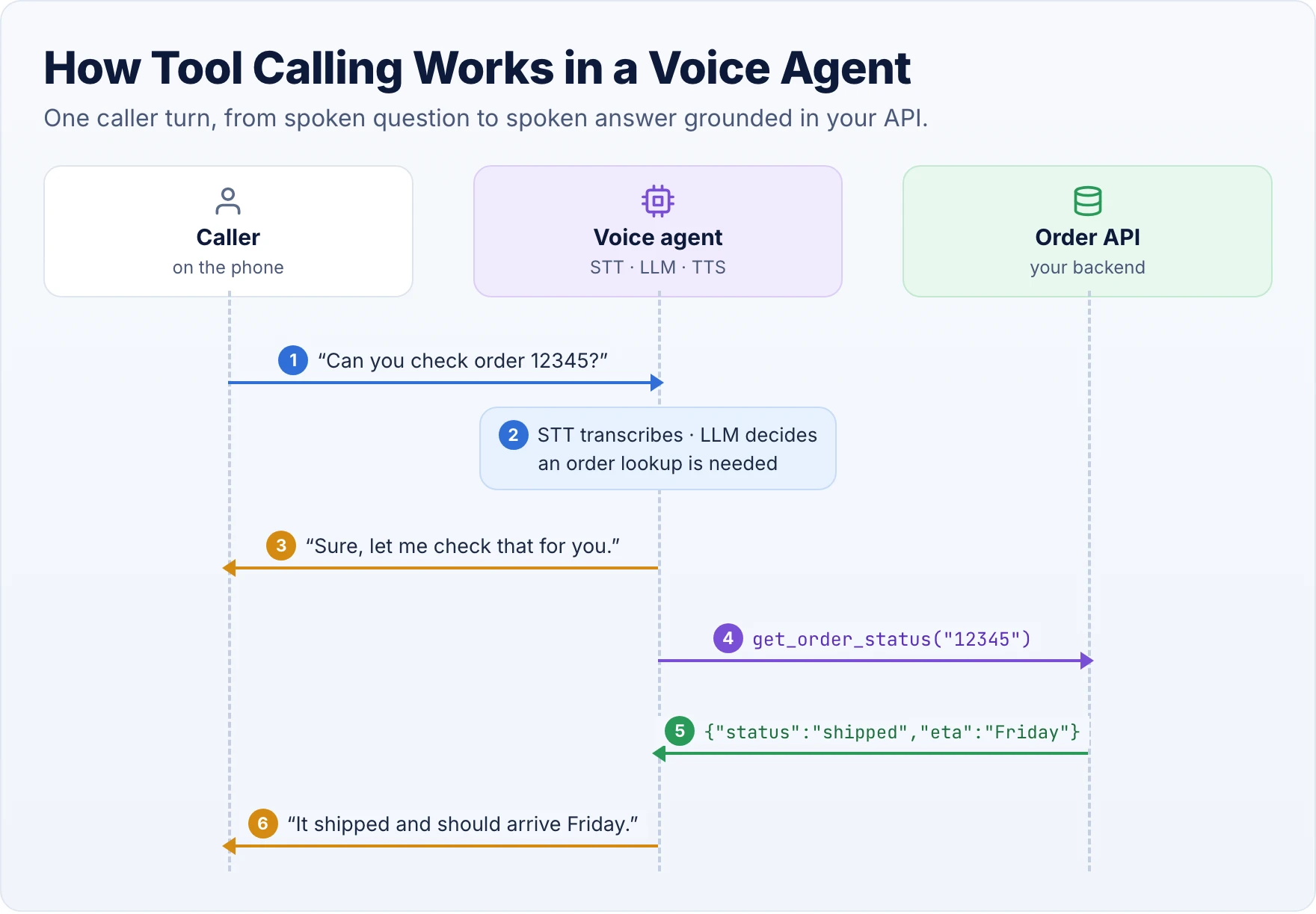
On every turn, STT transcribes the caller, the LLM decides whether it needs a tool, the agent runs the function, and the LLM turns the result into a short spoken reply that TTS streams back. The acknowledgement in step 3 is optional, but it is good practice for any tool that might take more than a second: silence on a phone line sounds like a dropped call.
That is also why the tool is async. While it waits on your API, the agent keeps processing audio, so it can still hear the caller and handle an interruption. For long-running work you can speak a progress update from inside the tool with self.session.generate_reply(...).
Adding write actions: scheduling and webhooks
Reading data is low risk. Tools that change things, such as booking an appointment, scheduling a callback, issuing a refund or cancelling an order, need more care. The usual pattern is to call a webhook in your backend and let it do the work:
- Confirm before acting. The docstring tells the LLM to read the details back first, and your prompt should say the same.
- Make it idempotent. LLMs and networks both retry. The idempotency key stops a repeated call from booking twice.
- Authorize in the backend, not the prompt, and log every write with the call ID so you can audit it later.
Step 4: Test your voice agent in the browser
About 2 minutes
Start the agent in development mode, which connects it to your LiveKit Cloud project:
Open the Agent Console for your project, start a session and allow microphone access. Then run through a short script:
You: "Hi, I need help with an order."
Agent: "Of course. What's your order number?"
You: "It's 12345."
Agent: "One moment while I check... Your order has shipped and should arrive Friday."
Now interrupt it. While the agent is answering, say "Actually, what's your return policy?" It should stop talking, take the new question and answer it. This is barge-in, and it is the clearest difference between a conversational agent and a traditional IVR that makes callers wait for a menu to finish.
What to test before you connect a phone number
- Does the agent understand ordinary questions phrased in different ways?
- Does it ask for missing details, such as the order number, instead of guessing?
- Does the tool return the right data, and does the agent report it accurately?
- Can you interrupt it naturally, and does it ignore "uh-huh" and "okay"?
- What does it say when the API is down or the order doesn't exist?
- Does it stay coherent over five or more turns?
Step 5: Connect a phone number for inbound calls
1 to 5 minutes if your telephony account is ready
Browser sessions are great for development, but customers call phone numbers. There are two ways to get audio to your agent:
- WebRTC for website support widgets and in-app voice. You already have this from step 4.
- SIP telephony to bring calls from the public phone network (PSTN) to your agent. That is what an inbound support line needs.
The fastest route is a number bought directly through LiveKit, currently available for US numbers:
Next, create a dispatch rule that puts each caller in their own room and sends your agent to answer. Save this as dispatch-rule.json:
The agentName must match the agent_name your entrypoint registers. Create the rule and attach it to your number:
Already have a business number with a carrier such as Twilio or Telnyx? Keep it. Point the carrier's SIP trunk at your LiveKit project, create an inbound trunk, and use the same dispatch rule.
Call the number from your phone. With lk agent dev still running, your agent answers. When you're ready to stop running it from your laptop, deploy it to LiveKit Cloud with lk agent create.
Phone calls surface problems browser tests don't: narrowband 8 kHz audio that lowers transcription accuracy, background noise, speakerphone echo, keypad (DTMF) input, carrier latency and callers who hang up mid-sentence. Test with real phones in real places.
Step 6: Monitor every call with a Voice AI Control Plane
This is where a demo becomes a service you can operate. Once real customers call, you need to answer questions that application logs alone can't:
- Why did this caller wait three seconds for a reply?
- Which transcript error led to the wrong answer?
- Did the LLM call the wrong tool, or did the tool fail?
- Did the caller interrupt, and did the agent stop?
- Which prompt, model and agent version handled this call?
- Did the caller actually get their problem solved?
A Voice AI Control Plane records each call as a single trace across the whole pipeline, with audio, transcript, model calls, tool calls and timings aligned on one timeline, and keeps track of which version of each component was live.
What to measure at each stage of the pipeline
The most important single number is end-to-end response latency: the time from the caller finishing a sentence to the first audible word of the reply. It is what the caller actually experiences. Track it as percentiles, not an average: a fast mean can hide the occasional multi-second pause that makes callers hang up. Our guide to sub-500ms voice agents covers how to bring it down.
How to debug a failed call
- Open the call in your call log and read the transcript.
- Play back the recorded audio, where recording is enabled and the caller has consented.
- Step through the trace: STT output, LLM decisions, tool calls and TTS, each with its timing.
- Find the stage that caused the failure.
- Tag the call so it becomes a test case for the next release.
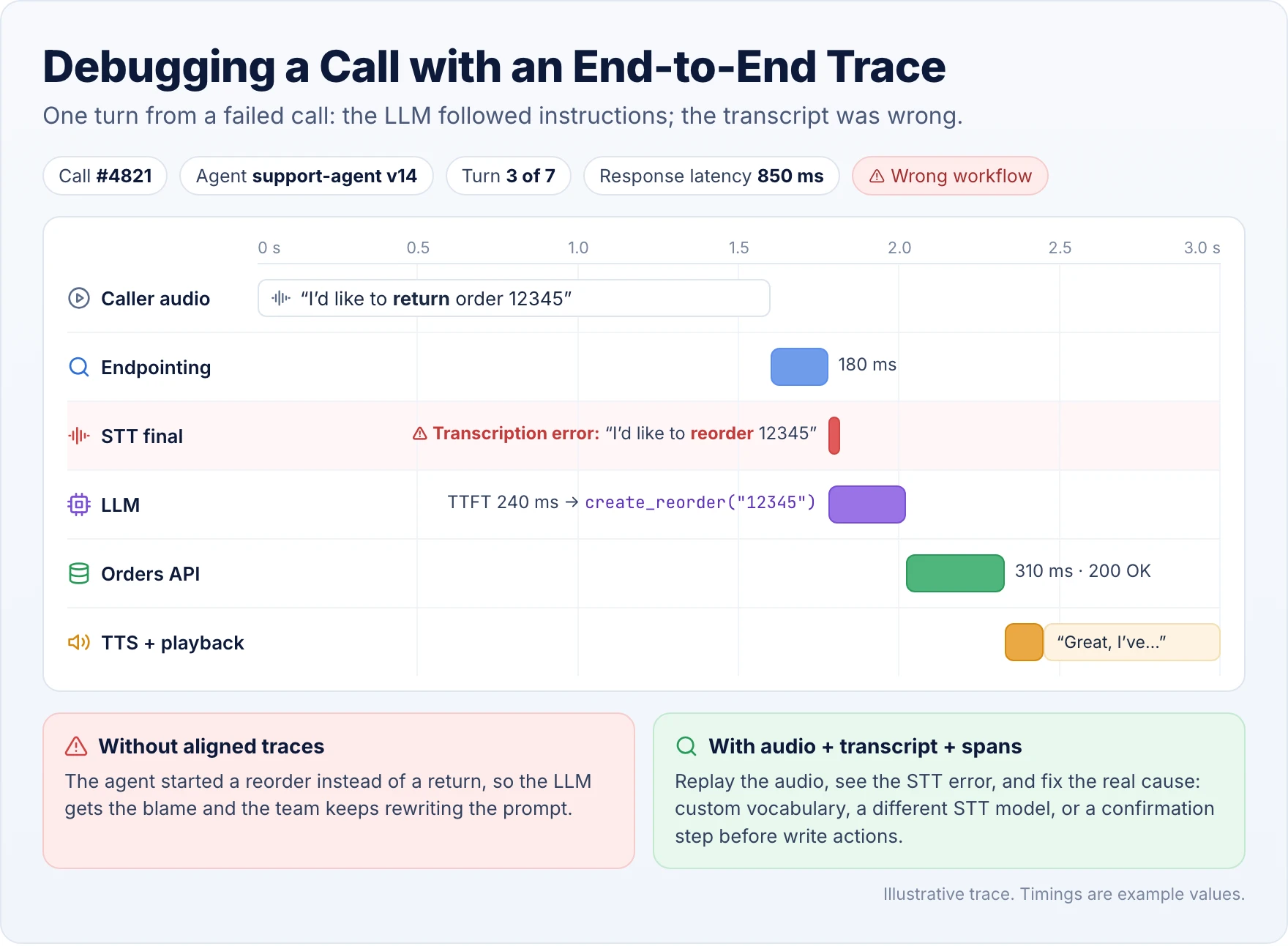
In this example, the caller said "return" and STT heard "reorder". The LLM did exactly what it was told with the text it was given. Looking only at the transcript and the outcome, an engineer would rewrite the prompt. With the audio and trace side by side, the real fix is clear: add custom vocabulary, try a different STT model, or have the agent confirm before any write action.
Step 7: Take your voice agent from prototype to production
A 10-minute prototype is a starting point, not a production certification. Before real customers call, work through this checklist.
Reliability
- Retry transient provider failures with bounded backoff, and set timeouts on every connection and tool.
- Give callers a path to a human whenever the agent can't help.
- Load-test concurrent calls and decide what happens if an STT, LLM or TTS provider goes down.
Security and privacy
- Verify callers before revealing account information, and authorize every tool call in the backend.
- Keep API keys in a secret manager, not in code or prompts.
- Minimize personal data in logs and recordings, and follow recording-consent and retention rules where you operate.
Conversation quality
- Test with background noise, different accents and speakerphones.
- Tune turn detection and interruption handling on real phone audio.
- Test callers who change their mind, correct themselves or ask two things at once.
Operations
- Capture structured traces and latency metrics for every call.
- Version prompts, tools and models together, so you know exactly what handled each call.
- Run changes against a set of recorded conversations before release, roll out gradually, and keep a one-step rollback.
Step 8: Keep improving with evaluation and retraining
Launch is where you start learning what your tests missed. Real callers use product nicknames STT doesn't know, ask questions you never anticipated and phrase requests in ways that confuse tool selection. Every one of those failures is training and evaluation data.
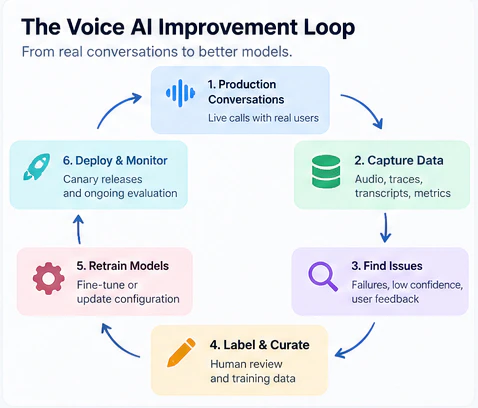
Not every failure needs retraining. Diagnose first, then pick the cheapest fix that works:
- Wrong tool or bad phrasing: improve the tool description or prompt.
- Misheard terms: add custom vocabulary, switch STT models or fine-tune a speech model on your audio.
- Domain reasoning errors: consider a smaller model fine-tuned for your support workflows.
Whatever the fix, test it against your tagged calls before it reaches customers, then roll it out gradually and watch the same metrics.
Build vs. buy: do you need a voice AI control plane?
Open-source frameworks such as LiveKit Agents and Pipecat are excellent foundations for building the agent itself. LiveKit pairs the agent framework with real-time media and SIP infrastructure; Pipecat focuses on composable pipelines and flexible transports. A control plane solves a different problem: operating the whole stack across development, testing, deployment and production.
For a single experimental agent, a framework on its own may be enough. If you run several agents, handle real call volume, evaluate specialized speech models or ship changes every week, a control plane removes a lot of undifferentiated work. We compare the options in depth in Voice AI Control Plane vs. DIY Orchestration, and the cost side in scaling voice AI agents to 1,000+ concurrent calls.
Frequently asked questions
How long does it take to build a voice AI agent?
A developer can have a basic conversational voice agent running in about 10 minutes using a maintained starter template and managed STT, LLM and TTS. A production deployment takes longer, because it also needs telephony, caller authentication, testing on real phone audio, observability and a human handoff.
Can I build a voice AI agent in Python?
Yes. Python frameworks such as LiveKit Agents and Pipecat handle real-time audio, speech recognition, language models, text-to-speech and function calling. Python is a good fit when the agent needs to call existing APIs, databases or machine learning services.
How do I connect a voice AI agent to a phone number?
Buy a number through your voice platform or use an existing number from a telephony provider, route it to your agent platform over a SIP trunk, and create a dispatch rule that sends each inbound call to your agent. The agent then receives the caller's audio and streams synthesized speech back.
What is the difference between a voice bot and a voice AI agent?
Traditional voice bots and IVRs follow fixed menus, scripts and decision trees. A voice AI agent uses speech recognition, a language model and tool calling to understand open-ended speech, keep track of the conversation and take actions in business systems.
What is the best framework for building a voice AI agent?
LiveKit Agents and Pipecat are the two most widely used open-source options. LiveKit suits teams that want integrated real-time media and SIP telephony; Pipecat suits teams that want flexible pipeline composition and transport choices. The right one depends on your telephony setup, infrastructure and provider preferences.
How does a voice AI agent call external APIs?
Through tool calling, also called function calling. You define functions with typed parameters and descriptions; when the LLM decides one is needed, the agent framework runs it, for example by calling your order API or a scheduling webhook, and the LLM turns the result into a spoken reply.
How do I reduce voice AI latency?
Use streaming STT, a low-latency LLM, incremental TTS, tuned turn detection and a persistent real-time audio connection, and host components close together. Measure the full time from the caller finishing a sentence to hearing the reply, at p50, p95 and p99.
How do I monitor a voice AI agent in production?
Record each call as an end-to-end trace that aligns the audio, transcript, LLM decisions, tool calls and per-stage timings, and track response latency percentiles, error rates, interruptions and resolution rate across calls. A voice AI control plane provides this in one place.
What makes a voice AI agent production-ready?
Reliable telephony, secure and authorized tool calls, fast responses, good interruption handling, call-level observability, error recovery, a human handoff and a repeatable process for testing and releasing changes. Low latency matters, but it is only one part of production reliability.
Start with a working agent, then make it observable
Building your first voice AI agent has never been easier. A Python starter, a well-written voice prompt and one tool give you a customer-support agent that answers real questions with real data, and a dispatch rule puts it on a phone line.
The long-term work is knowing what happened on every call, finding out why a conversation failed, and steadily improving the models and workflows behind the agent. That is what turns a 10-minute demo into a production voice agent.
About this tutorial
- Versions: CLI commands and APIs follow the LiveKit documentation as of October 2026. Frameworks in this space change quickly, so check current docs if a command differs.
- Timings: the "10 minutes" assumes your LiveKit, telephony and API credentials are already set up.
- Example data: Acme Store, the order API and the call trace are illustrative, not real systems or measurements.
Sources and further reading
- LiveKit: Voice AI quickstart
- LiveKit: agent-starter-python on GitHub
- LiveKit: Defining function tools
- LiveKit: Phone numbers
- LiveKit: SIP dispatch rules
- Pipecat documentation
- Sub-500ms Voice Agents: Optimizing the Full STT-LLM-TTS Pipeline
- Voice AI Control Plane vs. DIY Orchestration: When to Build, Buy, or Self-Host
- How to Scale Voice AI Agents to 1,000+ Concurrent Calls Without Breaking the Bank

Turn Calls into Deals
with Bearworks
Ready to get started? Book a demo: